
Jobright Review and Alternatives (2026)
Can Jobright Actually Find You the Right Job?
By Chester Liu, Founder of Hirecarta
Short answer: Jobright has a sleek UI and a genuinely interesting premise — let AI match you with jobs so you don't have to dig through job boards manually. The problem is that the core promise doesn't hold up. The job matching is unreliable, the resume customization produces hallucinations, and the free tier evaporates before you've had a real chance to evaluate the product. After hands-on testing, I came away thinking Jobright is more polished than it is useful.
Here's what actually happened.
What Is Jobright?
Jobright is an AI job search platform founded in 2023. Its central pitch is automated job matching: upload your resume, and Jobright's AI analyzes your background against a database of job listings to surface the ones that supposedly fit you best. It also includes resume customization, cover letter generation, application tracking, and a Chrome extension that overlays match scores while you browse job boards.
The landing page claims "8,000,000+ total jobs" and "400,000+ Today's New Jobs." Those numbers are hardcoded. They don't change. That's a small thing, but it set the tone for what I found throughout the platform: surface confidence that doesn't hold up under any scrutiny.
Pricing: $18/week, $40/month, or $90 for 3 months. There is a free tier, but it's so restricted you can exhaust it within a single active session.
How Jobright Works
The basic workflow:
- Upload your resume
- Jobright scans your background and surfaces job matches with a score
- For jobs you want to pursue, it generates a tailored resume and cover letter
- A Chrome extension overlays match scores while you browse job boards
- An application tracker lets you manage your pipeline
That's the loop. The idea is sound. The execution is where things fall apart.
Jobright Pricing: What You Actually Get
| Plan | Price | What's Included |
|---|---|---|
| Free | $0 | Extremely limited — exhausted in ~10 minutes of active use |
| Weekly | $18/week | Full access |
| Monthly | $40/month | Full access |
| Quarterly | $90 for 3 months | Full access, slight discount |
The free tier doesn't give you nearly enough room to evaluate whether the platform works for you before hitting the paywall. Three resume customizations and you're done. That's not a trial — that's a teaser.
What Jobright Does Well
To be fair, there are things worth acknowledging.
The UI is genuinely polished. Jobright looks good. The interface is clean and modern, and the first impression is strong. If surface design were the whole story, it would score well.
The Chrome extension concept is useful. The idea of seeing a job match score while you browse LinkedIn or Indeed without switching tabs is genuinely convenient. The execution has problems (more on that below), but the concept is right.
The "fit to one page" button is a small but practical feature. When customizing a resume, a button that automatically adjusts font size and line spacing to fit one page saves manual fiddling. More tools should have this.
What Frustrated Me About Jobright
The Job Matching Is Its Biggest Weakness
Jobright's entire value proposition rests on surfacing the right jobs. In practice, it doesn't.
After uploading my resume, which shows a clear track record in project management of solar and renewable energy projects, the top recommended match was a retail and commercial construction PM role. Jobright itself scored that match a 5.5 out of 10 and labeled it "Poor." And then it asked me if I wanted to improve my resume for it.
A tool that recommends jobs it scores as poor matches, and then prompts you to contort your resume to apply anyway, isn't matching. It's application spamming dressed up in AI language.
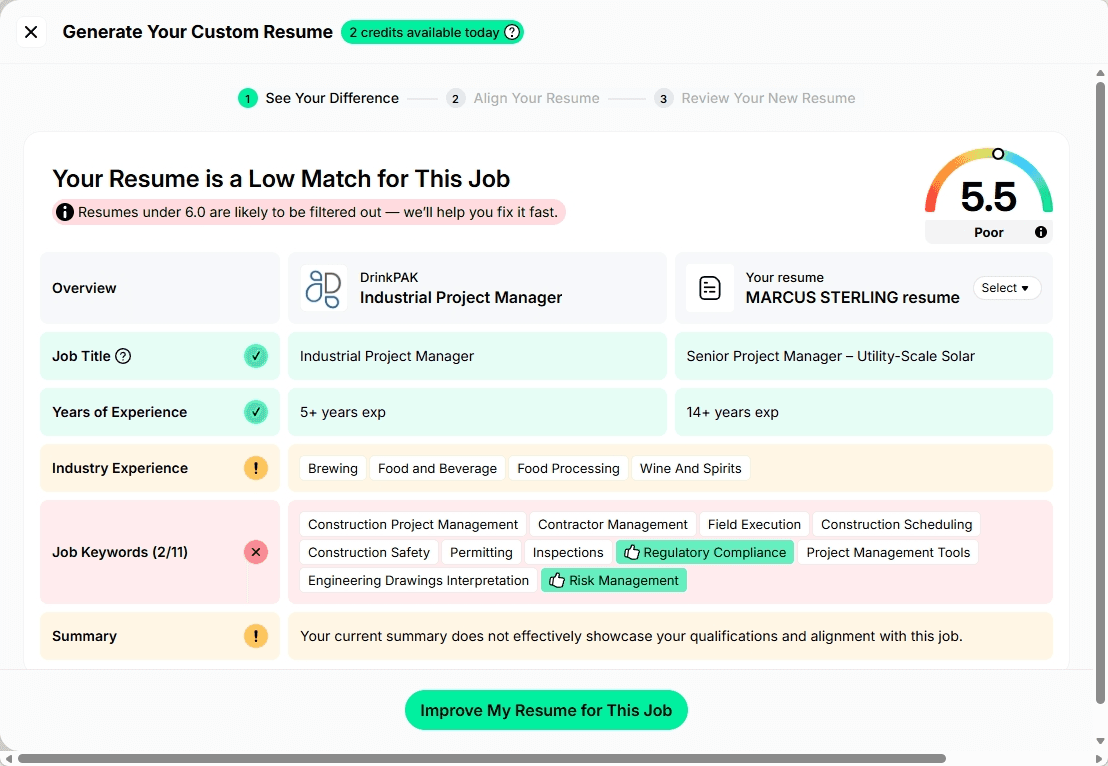
The match score itself breaks down into three components — experience, skill, and industry expertise — but there's no way to see why you got those scores. You're handed a number with no explanation. That opacity makes it impossible to know whether the score means anything, or how to actually improve your fit for a role.
Separately, after testing, I found dozens of better-matched project management roles in the utilities sector on LinkedIn that Jobright never surfaced. If the matching algorithm is missing the most relevant jobs, the whole premise falls apart.
The Keyword Matching Is Rigid and Decontextualized
When Jobright walks you through "missing keywords" before customizing your resume, it presents a checklist of terms to tick off. The problem is that the list is stripped of any context.
One keyword in my scan: "construction safety." Should I check that box? What does it mean in the context of this role? What would it add to my resume? The tool has no answer. It's just a word on a list.
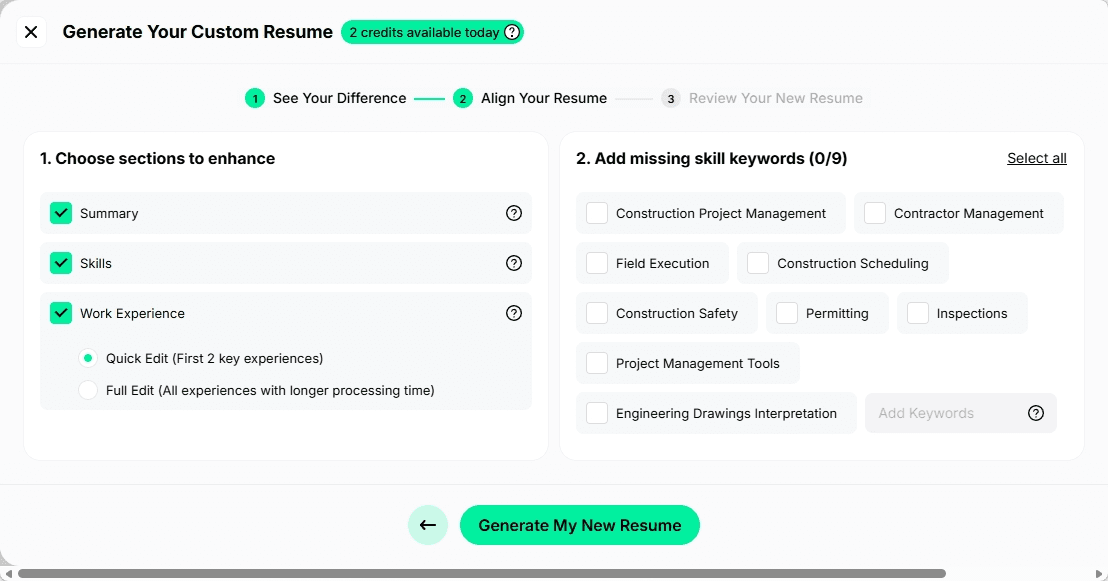
Another example: "Project Management Tools" was listed as a keyword. That's not a keyword. The names of specific tools — Procore, MS Project, Primavera — would be keywords. "Project Management Tools" is a category, and stuffing it into a resume tells a hiring manager nothing.
The Resume Customization Produces Hallucinations
This is the most serious problem. When Jobright generates a tailored resume, it doesn't limit itself to your actual background. It adds things.
In my test, the generated resume included claims about "ensuring construction safety" — a skill I don't have, didn't claim, and that wasn't in my source resume. It was added because "construction safety" appeared in the job description's keyword list.
The result was a resume score jump from 5.5 to 9.0. That looks like progress. It isn't. What actually happened is the tool fabricated experience I don't have, inflated a vanity metric, and created a resume that would get me into trouble the moment an interviewer asked about it.
Keyword stuffing in the competencies section made it worse. One output read: "Compliance & Safety: ... Construction Safety." That sentence means nothing to a hiring manager. It's noise — and it signals to anyone who reads carefully that the resume was AI-generated without human judgment. It's the same failure mode we found in Rezi's keyword targeting and in our own test of 10 leading AI models on the same resume prompt: hand an AI model a job description with the right keyword in it, and it will invent a matching credential.
The Cover Letter Is AI Slop
The cover letter generator produces generic, hollow output. One opening line from my test: "Your reputation for delivering exceptional commercial spaces in dynamic markets like Chicago and Phoenix strongly resonates with my track record of managing complex, high-value projects to successful completion."
I have no track record in commercial spaces. I have no connection to Chicago or Phoenix. This is the same hallucination problem from the resume, just in prose form. The platform took details from the job description, assumed they applied to me, and wrote confident fiction.
Cover letters produced like this don't just fail to help — they can actively hurt you if a recruiter reads them carefully.
The Chrome Extension Has a Consistency Problem
The Chrome extension shows job match scores as you browse LinkedIn and other job boards. That's a good idea. The problem is that the score shown in the extension sometimes doesn't match the score shown inside the Jobright platform for the same job.
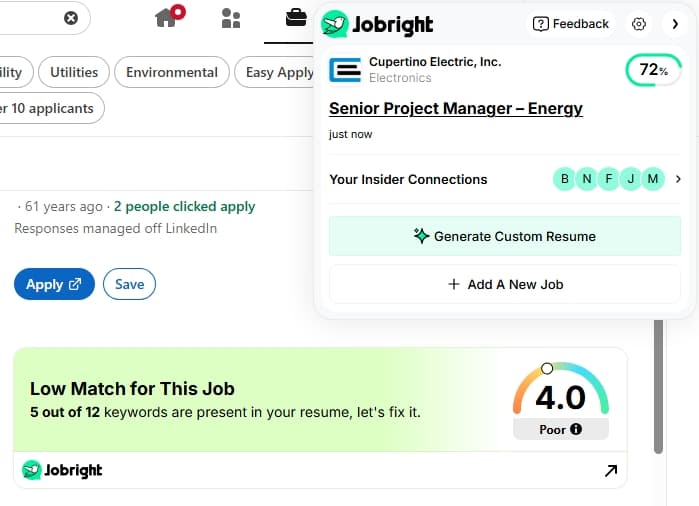
When a tool can't produce consistent scores for the same job across its own surfaces, it's hard to know what the score is actually measuring. For a feature that's supposed to help you decide which jobs are worth pursuing, that inconsistency is a significant problem.
The Application Tracker Is Too Simple
Application management offers five statuses: applied, interviewing, offer received, rejected, and archived. That's a very thin model of a real job search. There's no way to track screening calls, second interviews, ghosting, waiting for feedback, or the many other states an application moves through.
There's also no ability to take notes on a job. No sorting by date or any other attribute. If you're tracking more than a handful of applications, you'll quickly feel the limitations.
Font and Template Choices Are Behind the Times
The resume builder offers three font options: Helvetica, Times New Roman, and Arial. All three are decades old and not optimized for on-screen reading, which is how most recruiters and hiring managers actually consume resumes today. You can't change colors or make any meaningful visual customization. For a product launched in 2023, that's a surprising limitation.
Compared to Rezi or Kickresume, which offer genuinely modern templates and more typographic control, Jobright's resume design options are the weakest of the current crop.
The Free Tier Runs Out Before You Can Evaluate the Product
Three resume customizations and you hit the paywall. In practice, that's ten minutes of genuine use. You haven't had time to understand the workflow, test the matching quality, or decide whether the tool fits your situation before you're asked to commit.
That's not a generous free trial. It's a conversion tactic that prioritizes subscription revenue over letting users make informed decisions.
Who Is Jobright Actually For?
Jobright might suit someone who:
- Is casually exploring what's out there and wants a starting point beyond generic job board searches
- Doesn't mind paying $40/month quickly based on a very limited preview
- Wants a Chrome extension to overlay scores while browsing, even if those scores are inconsistent
For anyone doing a serious, active job search, the weaknesses compound quickly. The matching surfaces poor fits, the resume tool adds things you didn't say, the cover letters are hollow, and the tracker can't keep up with a real pipeline.
What a Good Job Matching Tool Should Actually Do
Jobright's failure points to a broader question: what would actually good AI job matching look like? Because the idea isn't wrong — the execution is.
1. It Should Understand Your Background Conceptually, Not Just Literally
A good matching system doesn't need to find the exact phrase "construction safety" in your resume to know whether you're a fit for a construction PM role. It should understand your experience in context: what sectors you've worked in, what scale of projects, what your actual responsibilities were. That requires more than keyword overlap.
2. It Should Show Its Work
A match score with no explanation is almost useless. Knowing you scored 5.5/10 doesn't tell you whether the gap is in industry experience, specific skills, or seniority level. A transparent system explains its reasoning so you can make an informed decision about whether to pursue a role or move on.
3. It Should Never Fabricate
Any tool that adds skills, experiences, or accomplishments to your resume that you didn't provide is creating liability for you. A good platform pulls only from what you've actually said about yourself. Higher match scores should reflect better positioning of your real background, not invented credentials.
4. It Should Help You After You Apply
Matching you to a job is step one. Helping you customize your materials thoughtfully, prepare for interviews, and track your progress through a realistic pipeline is the rest of the job search. A tool that stops at the application and leaves you to figure out the interview on your own has addressed a fraction of the problem.
5. It Should Give You Honest Signal, Not Optimistic Noise
A tool that scores a job "Poor" and then tells you to apply anyway isn't helping. A good platform should give you clear guidance: this is worth your time, this isn't, and here's why. Optimizing for application volume rather than application quality produces a worse outcome for the job seeker every time.
6. It Should Work Across Your Whole Search
Job matching doesn't happen in a vacuum. Your full background, your career goals, the way you position your story, the quality of your materials, and how you perform in interviews all interact. A platform that understands the full picture, rather than just scanning for keyword matches, is in a position to give you genuinely useful guidance.
Jobright Alternatives Worth Considering
For job discovery: LinkedIn and Indeed with refined filters will often surface better matches than Jobright's algorithm, at no cost. The manual effort is worth it when the automated matching is unreliable.
For resume building: Rezi and Kickresume both offer better template quality and more typographic control than Jobright. Don't assume that means their AI content generation is more trustworthy, though, in our hands-on testing Rezi's keyword-driven AI fabricated a production accomplishment just as confidently as Jobright's did.
For application tracking: Huntr offers a clean, free kanban board for managing your pipeline, though like Jobright it lacks the depth to track a complex application process end to end.
For a more complete workflow: The honest assessment is that Jobright was built around one feature — job matching — and the rest of the platform was built around that anchor. When the anchor has reliability problems, the whole thing wobbles.
What actually works in a job search is a connected workflow: a strong profile that captures your real background, job fit analysis that goes beyond keyword counting, customized documents that draw from what you've actually done, preparation for interviews, and tracking that reflects how job searches actually unfold. That's a harder thing to build than a matching algorithm, and most platforms haven't done it.
Hirecarta is the approach I'd recommend looking at. It's built around the idea that you should apply to fewer, better-matched jobs with stronger materials — not that you should let an algorithm decide which jobs are worth your attention based on keyword overlap. The job fit analysis is conceptual rather than literal, the resume and cover letter generation works from your actual profile, and it includes coaching and interview prep so you're not on your own after you click apply.
Frequently Asked Questions
Is Jobright worth it in 2026? For passive job seekers who want a starting point for job discovery, Jobright has some utility. For active job seekers, the free tier is gone before you can properly evaluate the product, the job matching surfaces poor fits, and the resume customization produces hallucinations. At $40/month, there are better options.
Does Jobright's AI job matching actually work? In hands-on testing, the matching surfaced jobs Jobright itself scored as poor fits and missed obviously relevant roles on other job boards. The scoring components are opaque, making it impossible to understand or trust the results.
Is Jobright free? There is a free tier, but you can exhaust it within 10 minutes of active use — after just 3 resume customizations. It's too limited to evaluate the platform meaningfully before being asked to pay.
What is the best alternative to Jobright? For job discovery, LinkedIn with refined filters often outperforms Jobright's algorithm for free. For a full-workflow platform covering job fit analysis, quality resume customization, application tracking, and coaching, Hirecarta is the most complete option available.
Does Jobright hallucinate on resumes? Yes. In testing, Jobright's resume customization added skills and experiences not in the source resume, including claims about "ensuring construction safety" for a candidate with no such background. It also engages in keyword stuffing that inflates match scores without improving actual job fit.
How much does Jobright cost? Jobright costs $18/week, $40/month, or $90 for 3 months. The free tier is very limited and can be exhausted within a single active session.
What does Jobright's Chrome extension do? The Chrome extension overlays job match scores as you browse job boards. However, the score it shows can differ from the score the platform itself shows for the same job, raising questions about reliability.
Related Reading
Last updated September 2026. Pricing and features were verified at the time of writing and are subject to change.