
Jobscan Review and Alternatives (2026)
Is It Worth $50/Month?
By Chester Liu, Founder of Hirecarta
Short answer: Jobscan is a niche ATS keyword tool that's been around since 2014. It does one thing: compare your resume to a job description and tell you how well the keywords match. If that's all you need, it's fine. But after spending real time inside the platform, I walked away thinking the job search space has moved well past what Jobscan offers, and that most people using it are being misled into thinking keyword matching is the same as getting hired.
Here's my honest take.
What Is Jobscan?
Jobscan is an ATS optimization platform founded in 2014. Its core premise is straightforward: upload your resume, paste a job description, and it scans both to identify keyword gaps. The idea is that many companies use Applicant Tracking Systems (ATS) to filter out resumes before a human ever reads them, and Jobscan helps you pass that filter.
It also includes a resume builder, a cover letter generator, a job tracker, and a job board. But as I'll get into below, those features are mostly afterthoughts bolted onto the core keyword-matching product.
Pricing: Jobscan's monthly plan runs $50/month. A quarterly plan costs $90 for 3 months (though you'll have to remember to cancel before it auto-renews). There is a free tier, but it's limited to 5 resume scans and heavily crippled.
How Jobscan Works
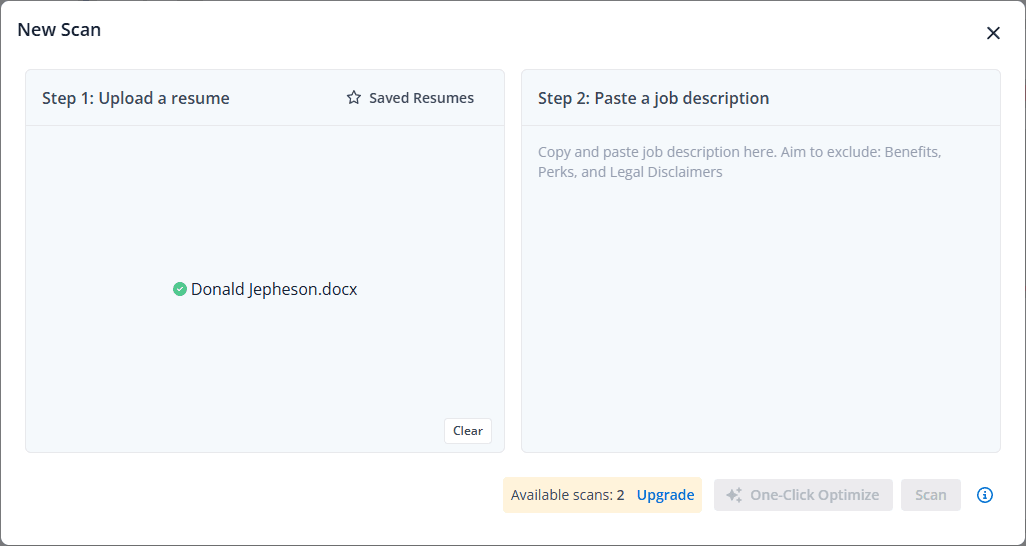
The workflow is simple in theory:
- Upload your resume (PDF or Word)
- Paste a job description from any job board
- Jobscan compares the two and gives you a "match rate" percentage
- It highlights missing keywords and suggests changes
- You update your resume and re-scan
That's the core loop. The idea is compelling, and in 2014 it was probably pretty novel. The problem is that the execution in 2026 has real issues, and the concept itself has some fundamental flaws that I'll explain.
Jobscan Pricing: What You Actually Get
| Plan | Price | What's Included |
|---|---|---|
| Free | $0 | 5 scans, very limited features |
| Monthly | $50/month | Unlimited scans, resume builder, cover letter, job tracker |
| Quarterly | $90 for 3 months | Same as monthly, slight discount |
A note on the trial: the 7-day free trial of premium features requires a credit card upfront. If you forget to cancel, you'll be charged $90 for the quarterly plan. This isn't disclosed prominently during signup.
What Jobscan Does Well
I want to be fair here. Jobscan isn't useless.
ATS education is genuinely helpful. Jobscan does a decent job explaining how ATS systems work, why keyword density matters, and what formatting choices can trip up automated parsing. For someone brand new to job searching, this context is valuable.
The match score is a useful concept. Having a concrete number, even an imperfect one, gives you something to react to. Seeing a 42% match before edits and a 71% after gives you a sense of progress.
The onboarding flow works for the first scan. If you're just testing it out, the upload-and-paste flow is quick.
What Frustrated Me About Jobscan
This is the part I think most reviews gloss over. I spent real time in the platform, and there were issues at almost every turn.
The Keyword Matching Is Less Accurate Than You'd Expect
On a sample scan, Jobscan flagged "internal software," "schedules," and "sale" as critical keywords, while completely ignoring "Notice to Proceed (NTP)" and "manage permitting process." Those omissions were far more relevant to the actual role.
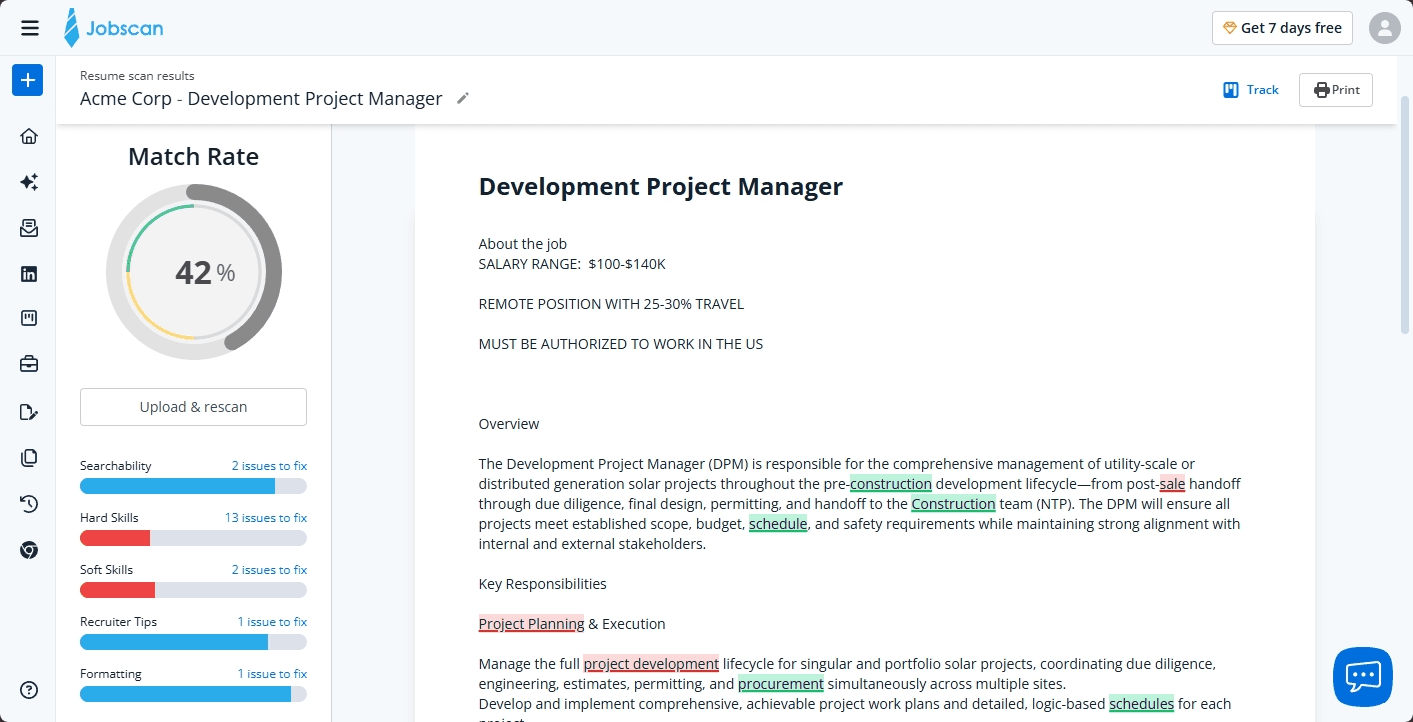
There doesn't seem to be a coherent pattern to what the algorithm considers a keyword or not. And when your match rate is based on faulty keyword extraction, a high match score gives you false confidence.
The AI Encourages You to Misrepresent Yourself
This one bothered me the most.
When you click "AI Suggested" changes, you're shown bullet points to add to your resume. The problem: they're fabricated. They describe accomplishments and skills that aren't yours. One cover letter generated by Jobscan included: "At Solar Solutions Inc., I successfully managed a portfolio of 15 utility-scale projects." I had never worked at that company. I had managed utility projects but not 15 of them.
If you click "Accept All" AI changes, you get a confetti animation and an impressively high match score. You also get a resume that's partly a lie. Real resume coaches would be horrified by this.
The advice is also sometimes counterproductive. Even though my resume listed "Senior Project Manager," Jobscan suggested removing "Senior" because the job description didn't include that exact word. That's the kind of mechanical keyword logic that ignores how resumes are actually read by humans.
The UI Is Confusing and Redundant
The platform feels like several unrelated tools stitched together. I was working on a resume in the "AI Optimize" tab, made edits, and generated a cover letter. Then I clicked the "AI Cover Letter" tab and the work I'd done was gone. I was back to a blank upload screen. The two tabs don't share state.
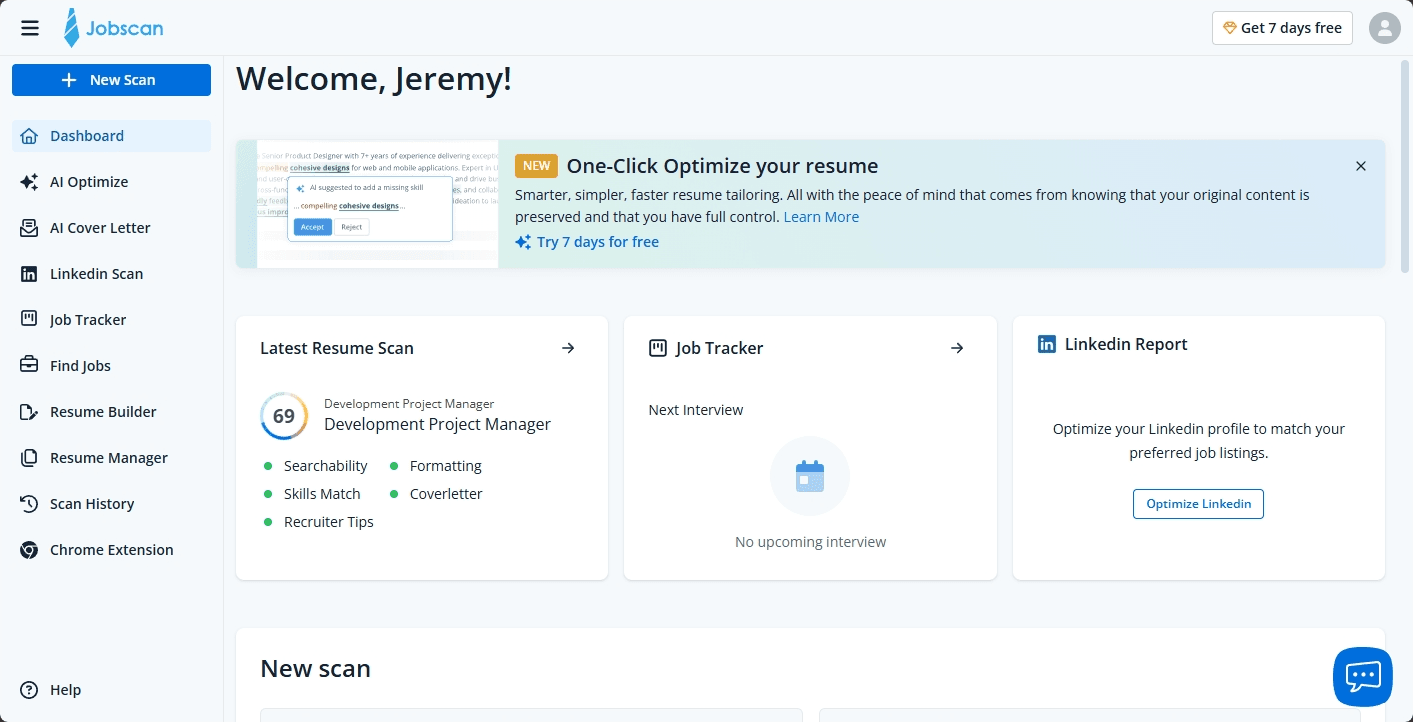
Similar issues exist throughout: features that seem like they should talk to each other don't.
The Job Tracker Is Hard to Use at Scale
The job tracker uses a Kanban board layout. This works fine when you're tracking five or ten applications. But if you're seriously job searching and tracking 30, 50, or 100 applications, a Kanban board becomes a nightmare. There's no table view, no filtering, no way to sort or surface the information you actually need quickly.
The Resume Builder Has Real Limitations
You get five templates. They all look similar. You cannot adjust fonts, font sizes, or colors, only line spacing and margins.
The Free Tier Is More of a Bait
Five scans is enough to see how the tool works, but not enough to use it meaningfully. And the path from free to paid is designed to create confusion. The 7-day "trial" route requires a credit card and defaults you into the $90 quarterly plan if you forget to cancel.
Ad Tracking Cookies Are On By Default
Jobscan installs third-party tracking from LinkedIn, Facebook, Google, Doubleclick, YouTube, and others by default. You have to find the opt-out yourself, and it's not easy to locate.
Who Is Jobscan Actually For?
Honestly, Jobscan is best suited for someone who:
- Is applying to corporate roles in industries where ATS screening is heavily used
- Has a specific resume ready and wants a quick keyword gap check before submitting
It's a point tool. It solves one narrow problem. If all you need is an ATS keyword check for a one-time application, a $50/month subscription is hard to justify, but the free tier might be enough.
For anyone doing an active job search, applying to multiple roles, wanting to tailor their materials, and hoping to actually get hired rather than just pass a filter, Jobscan has significant gaps.
One more thing worth knowing before you commit to a subscription: if you search Reddit, you'll find a consistent pattern of complaints about poor customer service experiences. And a look at Glassdoor paints a picture of a company with a difficult internal culture. Neither of those things is a dealbreaker on their own, but combined with the product issues above, they suggest a company that isn't in a great place right now.
What a Good Job Search Tool Should Actually Do
Here's where I want to step back from Jobscan specifically and think about what people actually need when they're job searching. Because keyword optimization is one small piece of a much larger puzzle.
1. It Should Understand Job Fit Beyond Keywords
Passing an ATS filter and being a good fit for a job are two different things. A tool that only does keyword matching can tell you that "project management" appears in both your resume and the job description. It can't tell you whether your background in aerospace operations actually translates to what a fintech company means when they say "project management."
Genuine job fit analysis requires understanding your experience conceptually, not just literally.
2. It Should Help You Customize Materials Thoughtfully
Every job is different. A tool that generates a generic resume or a cover letter with invented accomplishments isn't customizing anything. It's producing noise. Real customization means drawing from your actual background and positioning your real experience in a way that's relevant to a specific role.
3. It Should Help You Prepare for What Comes After the Application
Getting past ATS is not the goal. Getting hired is. A tool that helps you craft a resume but leaves you on your own for the phone screen, the hiring manager interview, and the technical round has only addressed maybe 20% of what you need.
4. It Should Give You Career-Level Context, Not Just Application-Level Fixes
Many job seekers aren't just looking for a job, they're figuring out a career direction, evaluating whether a pivot makes sense, or trying to understand how to position a non-linear background. ATS keyword tools have nothing to say about any of that. But those questions are often the ones that determine whether a job search goes well or not.
5. It Should Be Honest With You
A platform that celebrates you hitting a high match score by accepting AI-generated bullet points about things you've never done isn't helping you. It's setting you up for failure in an interview. Good tools should be calibrated toward your actual success, not toward vanity metrics.
6. It Should Help You Apply Strategically, Not Just Prolifically
Bulk applying to dozens of jobs with a generic resume is a well-documented losing strategy. Response rates hover around 2-3%. Applying selectively to roles where you're genuinely well-matched, with customized materials, consistently outperforms volume. A tool built around helping you apply thoughtfully rather than quickly is going to serve you better in the long run.
Jobscan Alternatives Worth Considering
Given the limitations above, here are categories of tools that address different aspects of what Jobscan misses.
For resume optimization focused on ATS: Rezi and Kickresume both produce better-looking resumes with AI-assisted content, though they share some of Jobscan's blind spots around strategic positioning, and Rezi has its own AI reliability issues worth knowing about first.
For application tracking: Huntr is a solid free option if you want a visual Kanban board for your pipeline. Just know it's entirely manual and has no AI features.
For volume applying: AiApply and Jobright both lean into automation and bulk application workflows. These work if speed is your priority, though the quality trade-off is real.
For a more complete approach: The honest answer is that most of the tools in this space, including Jobscan, were built around solving one piece of the job search process. Resume. ATS. Tracking. Each one does its thing in isolation. If you're doing a serious job search, you end up paying for three or four different subscriptions and still don't have a coherent workflow.
What I'd actually recommend looking for is a platform that treats the job search as a single connected process: building and maintaining a strong profile, analyzing job fit at a conceptual level, generating customized documents from your real experience, tracking your applications, coaching you through interviews, and giving you strategic guidance on your career. That combination, rather than any single-feature fix, is what actually moves the needle.
Hirecarta is the closest thing I've found to that. It combines AI career coaching, per-job resume and cover letter customization, job fit analysis, application tracking, and interview prep in one place. It's designed around the idea that you should apply to fewer, better-matched jobs with higher-quality materials, rather than optimizing for volume or ATS games. The pricing is a fraction of what career coaches charge, and unlike Jobscan, it's not going to ask you to fabricate accomplishments to hit a keyword score.
Frequently Asked Questions
Is Jobscan worth it in 2026? For a targeted, one-time ATS check on a specific application, the free tier may be enough. For an ongoing job search, $50/month is hard to justify given the UI issues, inaccurate keyword matching, and the absence of coaching, interview prep, and meaningful customization.
Does Jobscan actually help you get a job? It may help your resume pass initial ATS filtering, but it doesn't address the majority of what determines whether you get hired: interview performance, job fit, cover letter quality, and how well you're positioned for a specific role. There's no evidence that high Jobscan match scores correlate with higher offer rates.
Is Jobscan free? There is a free tier, but it's limited to 5 resume scans and doesn't include most features. Meaningful use requires a paid subscription.
What is the best alternative to Jobscan? It depends on what you need. For ATS-focused resume help, Rezi or Kickresume are better-designed. For application tracking, Huntr is free and intuitive. For a platform that handles the full job search workflow including coaching, customized documents, and job fit analysis, Hirecarta is the most complete option available.
Can Jobscan hurt your chances? Potentially, yes. If you accept AI-suggested changes that describe experiences or skills you don't have, you'll score higher in the tool but create problems in interviews. A resume that games ATS but misrepresents you is worse than a lower-scoring resume that's accurate. We found the same pattern across every AI resume tool we've tested.
What does ATS optimization actually mean? Applicant Tracking Systems scan resumes for relevant keywords before routing them to human reviewers. Optimization means making sure your resume contains the language a specific job description uses. It's useful, but it's one filter in a longer process, not a guarantee of interview success. For a look at what recruiters actually see on their end, read how recruiters use ATS software day to day.
How much does Jobscan cost? Jobscan costs $50/month for the monthly plan or $90 for 3 months on the quarterly plan. The free tier is limited to 5 scans. The 7-day trial requires a credit card and defaults to the $90 quarterly plan if not cancelled.
Related Reading
Last updated September 2026. Pricing and features were verified at the time of writing and are subject to change.