
The Truth About ATS Scores
How Workday, Greenhouse, and Enterprise Systems Actually Evaluate Resumes
By Chester Liu
A pervasive piece of advice dominates job search forums, social media, and resume preparation websites: modern Applicant Tracking Systems (ATS) run complex algorithms that calculate an exact score from 0 to 100 for every uploaded resume, and if your resume fails to hit an 80% threshold, an automated bot silently rejects your application before a human ever sees it.
To solve this manufactured panic, an entire commercial ecosystem of third-party resume checkers has emerged. These tools charge job seekers recurring monthly subscriptions to paste in a job description, paste in a resume, and chase an arbitrary percentage score by inserting repeated phrases. We've tested several of them hands-on, including Jobscan and Rezi, and found the scores they show you have little to do with how the systems below actually work.
The reality, documented in the technical architecture, administrative manuals, and compliance disclosures of the ATS platforms themselves, is entirely different.
Most enterprise ATS platforms do not calculate a native percentage match score for incoming resumes. Those that do incorporate machine learning algorithms use them to categorize or rank candidates for human review queues, not to execute autonomous rejections. When automated rejections do occur, they are driven by deterministic form fields, not semantic resume parsing.
Here is what primary documentation and administrative guides from six major ATS vendors reveal about how resumes are actually parsed, ranked, and reviewed.
The universal filter: knockout questions, not resume algorithms
Every major ATS vendor features an automated rejection mechanism, but it does not evaluate the prose in your resume. It operates on structured form inputs known across the industry as knockout questions or disqualification rules.
When an applicant receives an automated rejection letter three minutes after submitting their application, they frequently assume an artificial intelligence algorithm scanned their document and found it wanting. In reality, the candidate answered a single form field in a way that violated a non-negotiable job requirement.
What triggers an instant automated rejection?
Instant rejections are triggered by hard form inputs: lack of legal right to work in the country without sponsorship, lack of an active professional license, inability to work on-site in a mandatory geographic location, or salary expectations that exceed the preconfigured ceiling for the requisition. The resume file is rarely parsed before these gatekeeper rules execute.
The implementation of these knockout rules across the major platforms follows a remarkably consistent pattern documented in their administrative manuals:
- Oracle Taleo Enterprise Edition: Taleo maintains a centralized Disqualification Questions Library managed exclusively by content managers and system administrators. These are mandatory, single-answer questions bound to Organization, Location, and Job Field (OLF) structures. When a requisition matches those parameters, the disqualification questions are automatically attached. If an applicant selects a disqualifying answer, the Candidate Selection Workflow (CSW) automatically dispositions the applicant as disqualified without parsing the resume.
- Greenhouse Recruiting: Greenhouse provides an automated rule engine termed Auto-reject for organizations on Plus and Pro subscription tiers. As detailed in official Greenhouse documentation, auto-reject rules can only be attached to custom job post questions configured with three specific answer formats: Yes / No, Single-select, or Multi-select. When a candidate chooses the disqualifying response, the system automatically assigns a rejection reason, applies custom tags, and can dispatch a rejection email template. Crucially, Greenhouse notes that hiring team members configured to receive alerts for new applications are not even notified of auto-rejected candidates. The applicant is screened out at submission time by the form field, completely bypassing resume parsing.
- Ashby: As detailed in Ashby's documentation on Global Application Questions and Global Auto-Reject Rules, organizations configure automated rejection workflows at both the job posting level and across global organization scopes (such as specific departments or locations). These rules evaluate candidate responses to structured form fields (Yes/No, single-select, multi-select, number, date) strictly at the moment of submission. When a candidate's answer triggers an auto-reject condition, Ashby assigns a predefined Archive Reason and can schedule a rejection email with a configurable delay (measured in business days) to prevent candidates from receiving an instantaneous, jarring rejection notice.
- Workday Recruiting: Workday allows organizations to establish prescreening questionnaires as part of its AI for Recruiting and talent management suite. Candidates who fail mandatory criteria can be dispositioned immediately, ensuring recruiting teams do not spend resources on non-viable applicants.
- iCIMS: In iCIMS, automated disqualification is executed via job-specific screening questions. If a candidate's responses violate mandatory job requirements, the system dispositions the profile into an unqualified bin immediately, bypassing the Coalesce AI candidate ranking model.
- Lever: Lever attaches knockout rules to custom application form questions. When an applicant fails a mandatory knockout condition, Lever automatically dispositions the application and routes the profile to the archive with an assigned reason code, bypassing the Fast Resume Review queue.
Across all six major platforms, automated rejection is deterministic, rule-based, and tied to form inputs. It is not an algorithmic verdict on your resume writing style.
How the major ATS platforms handle scoring: a vendor breakdown
To understand why third-party match scores fail to reflect reality, one must examine how the underlying software platforms treat scoring, search, and candidate presentation.
| Platform | Native 0-100% Resume Score? | How Auto-Rejection Actually Happens | Primary Recruiter Screening Interface |
|---|---|---|---|
| Greenhouse | No percentage score. Categorizes resumes into 5 tiers (Strong, Good, Partial, Limited, Needs manual review) represented by 4 indicator dots via Talent Matching. | Form questions only (Yes/No, Single/Multi-Select). | Application Review grouped by Talent Matching tier; human Scorecards. |
| Workday | No percentage score. Assigns letter grades (A, B, C, D) and plain-language Fit and Gap explanations via HiredScore LLM, plus Skills Cloud match tiers. | Prescreening knockout questionnaires. | Candidate list sorted by HiredScore grade (A/B) and Skills Cloud match tier. |
| iCIMS | Yes (Candidate Ranking and Role Fit scoring via Coalesce AI). | Job-specific disqualification screening questions. | Candidate ranking view; legally audited human-in-the-loop. |
| Lever | No percentage score. Flags "Top Match" designations with qualitative Match Justifications (strengths and clarification areas) via AI Screening Companion LLM. | Form knockout rules; automated nurture archive. | Pipeline with green "✦ TALENT FIT" badges; Fast Resume Review triage queue (manual advance/archive). |
| Ashby | Yes (AI Job Criteria Met %, assistive). Evaluates up to 50 criteria per role into Meets / Does Not Meet / Undecided statuses. | Global and job-specific auto-reject question rules with configurable email delays. | Application Review pipeline with extracted evidence citations; independent of human reviewer scorecards. |
| Oracle Recruiting & Taleo | No percentage score. Oracle Cloud displays a 0 to 3 star rating across 4 categories; Taleo flags ACE Candidates. | Disqualification and prescreening question rules. | Suggested Candidates card with 0 to 3 star breakdown; Taleo ACE Candidate badges. |
Greenhouse: Talent Matching calibrations and the five match tiers
Greenhouse is one of the most widely deployed ATS platforms in technology and high-growth sectors. Historically celebrated for its strictly manual review workflows, Greenhouse introduced Talent Matching, available across Core, Plus, and Pro subscription tiers through its Real Talent suite.
Talent Matching dispels the myth of an arbitrary 0 to 100 percentage score, while revealing how modern enterprise ATS platforms actually deploy artificial intelligence:
- Role Calibration: Before candidate resumes can be evaluated by AI, recruiters or hiring managers configure a calibration for the requisition by clicking Configure with assistant or editing calibration criteria manually. Recruiters define 4 to 6 core skills, assign importance weightings using sliders, and designate required years of experience, target industries, and previous job titles. The AI assistant can automatically draft calibrations from the job description and scorecard attributes.
- Five Match Score Tiers and Indicator Dots: When an applicant submits a resume, Greenhouse parses the document and categorizes the candidate into one of five qualitative tiers: Strong match, Good match, Partial match, Limited match, or Needs manual review. In the recruiter workspace, these match tiers are displayed via four visual indicator dots (for example, two filled dots and two empty dots for a Partial match) in the Match score column, and candidates in the Application Review stage are grouped directly by these match tiers.
- Explainable Matching and Resume Highlighting: When a recruiter opens a candidate profile, Greenhouse displays a side panel detailing why the applicant received their match score. The interface shows matched experience, industry alignment, and exact counts (such as 'Calibrated skills matched: 3 of 4'). Crucially, Greenhouse renders an interactive resume preview where exact keyword matches and similar terms are highlighted in real time based on the active calibration.
- Recruiter Override: If an applicant's resume is miscategorized due to non-standard phrasing, recruiters can click the yellow Override button on the candidate row to adjust the classification manually.
- Assistive AI, Not Automated Rejection: Greenhouse documentation explicitly states that Talent Matching is assistive intelligence rather than automated decision-making. The software does not automatically reject applicants placed in the 'Limited match' category. Human recruiters must manually advance or archive candidates, with automated rejection strictly confined to the separate Auto-reject application rules configured on form dropdown fields.
- Compliance and Candidate Opt-Out: In response to emerging regulations such as the California Automated Decision-Making Technology (ADMT) rules, Greenhouse provides candidate disclaimers and allows employers to enable AI opt-out controls. Applicants who request manual evaluation bypass algorithmic scoring and are routed directly into the 'Needs manual review' queue.
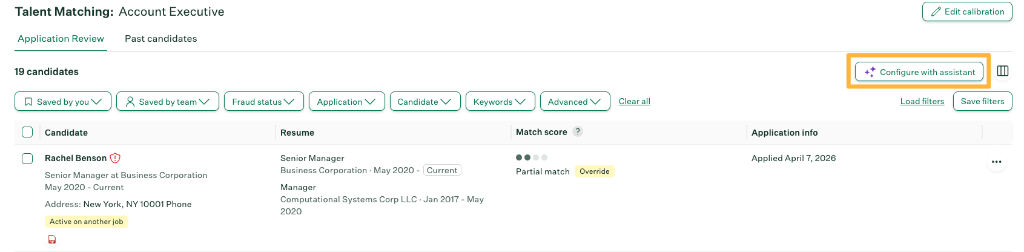
Official Greenhouse Talent Matching interface showing candidate Rachel Benson with a Partial match score (represented by indicator dots) and a manual Override button, alongside the Configure with assistant button used to calibrate role criteria. Source: Greenhouse Documentation.
Workday: Skills Cloud intelligence, HiredScore candidate grading, and LLM-driven Fit and Gap evaluation
Workday is the dominant Human Capital Management (HCM) and recruitment platform for Global 2000 enterprises. To manage high volumes of applications, Workday's modern recruitment architecture combines two core intelligence systems: the underlying Workday Skills Cloud standardized skills database and HiredScore AI for Recruiting, powered by the Recruiting Agent.
Together, these platforms dismantle the myth of a primitive 0 to 100 percentage score:
- Skills Cloud Foundation: Rather than running a naive keyword counter, Workday Skills Cloud standardizes competencies using a centralized database of more than 50,000 verified skills. It executes synonym normalization (recognizing that 'React.js', 'ReactJS', and 'React library' refer to the canonical skill entity 'React') and relationship mapping (inferring cloud infrastructure capabilities from Docker and container orchestration). Skills Cloud evaluates candidate capabilities against job requisitions to establish qualitative tiers: Strong Match, Good Match, Fair Match, or Low Match.
- HiredScore Candidate Grading: As documented in the official HiredScore AI Recruiting Agent datasheet, Workday deploys machine learning algorithms to perform candidate grading, displaying visible letter grades (Grade A, Grade B, Grade C, or Grade D) directly on the recruiter's applicant queue. Grade 'A' and Grade 'B' badges surface high-priority candidates with clear reasoning and actionable next steps.
- LLM-Powered Fit and Gap Evaluation: As revealed in official Workday documentation on Workday HiredScore Spotlight Fit and Gap Enhancement with LLM, Workday has evolved beyond legacy keyword matching by integrating Large Language Models directly into HiredScore's screening engine. The LLM extracts each basic and preferred qualification from the job description and evaluates them individually against the candidate's parsed resume (work experience, education, skills, certifications, and summary).
- Deterministic Grade Logic: The LLM uses a structured evaluation hierarchy. Meeting all scoped basic qualifications determines whether a candidate receives Grade A or Grade B. Candidates who fall short on one or more basic qualifications receive Grade C or Grade D. The candidate's scores on preferred qualifications and relative strength across basic requirements further differentiate an 'A' from a 'B' and a 'C' from a 'D'.
- Explainable Natural Language Citations: Instead of an opaque number, the LLM provides recruiters with plain-language rationales and clickable evidence links directly inside the HiredScore interface (for example, "Qualify because the candidate holds a Master's degree in Marketing, which exceeds the required bachelor's degree" or "Qualify because the candidate explicitly assisted with planning and executing marketing events during the internship").
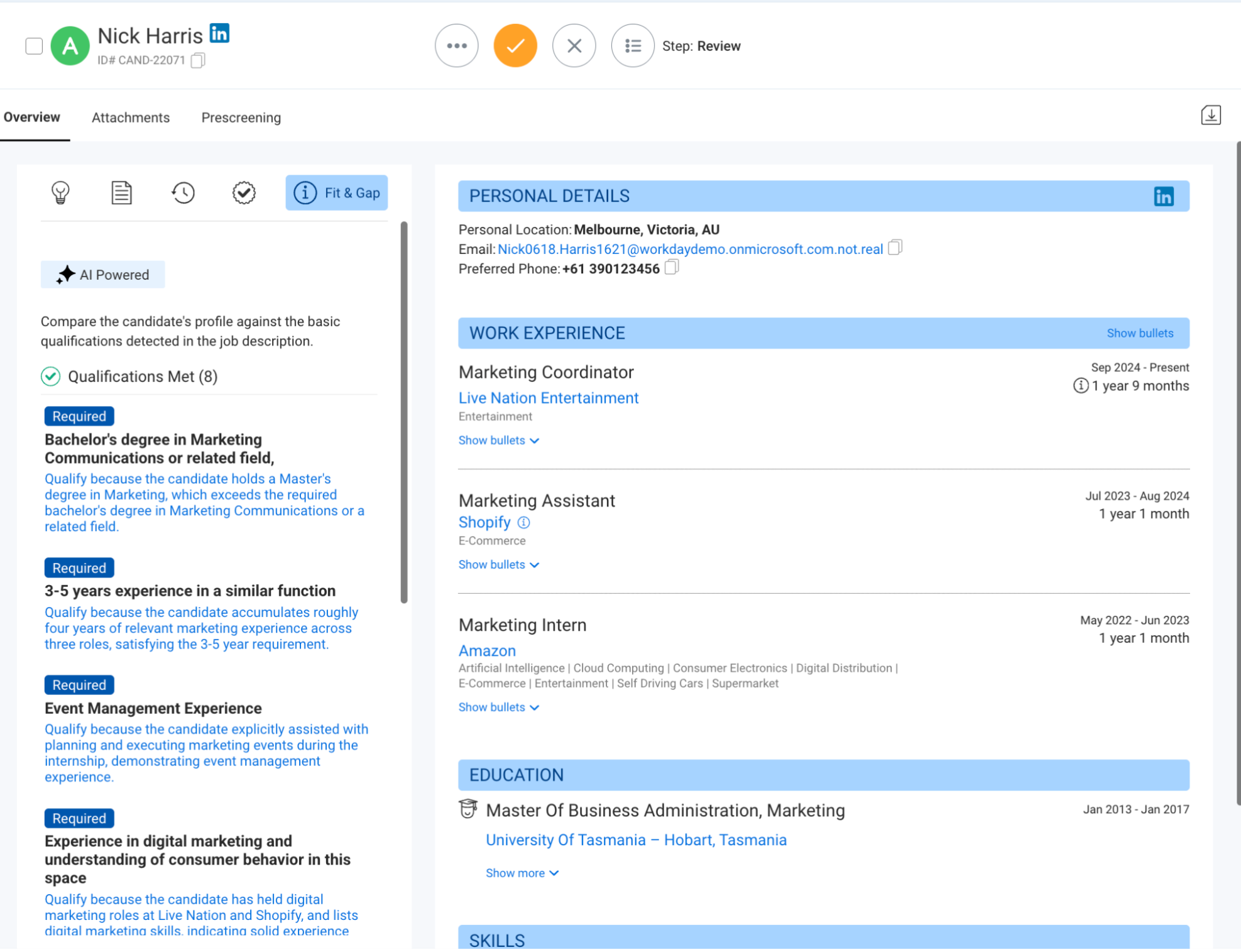
Official Workday HiredScore interface showing LLM-driven Fit and Gap qualification evaluation and Grade A assignment for candidate Nick Harris. Source: Workday Documentation (August 2026).
- Recruiter Elevation: Workday reports that automated candidate grading yields a 57% decrease in recruiter screening time and a 35% reduction in hiring manager review time. The tool elevates the strongest candidates to the top of the queue so recruiters can initiate outreach faster, rather than reading hundreds of resumes sequentially.
- Proactive Talent Rediscovery: The Recruiting Agent evaluates past applicants and CRM leads before a requisition is even posted externally, with Workday reporting that up to 70% of requisitions can be covered by existing talent pools.
- Assistive Prioritization, Not Automated Disposal: Crucially, HiredScore AI and Skills Cloud operate as assistive recommendation engines with audited bias safeguards. The software does not automatically reject applicants who receive a 'C' or 'D' grade or a 'Low Match' tier. Rejection of low-graded candidates remains a human decision, with automated rejections strictly driven by prescreening questionnaires and knockout criteria.
iCIMS: Coalesce AI, Candidate Ranking, and compliance audits
iCIMS processes millions of applications across retail, healthcare, financial services, and enterprise tech. In March 2026, iCIMS unified its intelligence capabilities under iCIMS Coalesce AI, replacing legacy references to Talent Cloud AI and consolidating technologies from its earlier acquisition of Opening.io into an enterprise-wide intelligence layer.
Within the Coalesce AI suite, Candidate Ranking and Role Fit represent one of the few enterprise ATS features that compute a genuine algorithmic score for applicants. The system parses candidate resumes, extracts normalized entities (skills, education, tenure, job titles), and compares them directly against the job profile to assign a relative fit indicator and rank order applicants for recruiter review.
Beyond passive ranking, Coalesce AI deploys active workflow assistants, including an AI Sourcing Agent for talent rediscovery, generative writing assistants for recruiter outreach, and conversational agents for high-volume frontline screening.
However, the operational deployment of candidate ranking in iCIMS is heavily constrained by law and platform governance:
- Human-in-the-Loop Safeguards: iCIMS documentation emphasizes that Coalesce AI is an assistive decision-support layer. The AI cannot advance a candidate to an interview or dispatch an automated rejection notice on its own; human recruiters retain ultimate control and manually execute status transitions.
- Local Law 144 Compliance and Bias Audits: Because iCIMS Candidate Ranking computes a score that orders applicants, iCIMS explicitly designates it as an Automated Employment Decision Tool (AEDT) subject to regulations such as New York City Local Law 144. To comply with legal mandates, iCIMS conducts regular independent third-party bias audits across race, ethnicity, and gender categories, publishing audit certificates and disparate impact ratios via its Trust Portal (detailed in the iCIMS Responsible AI framework).
- Explainable AI: Coalesce AI surfaces the rationale behind its recommendations, showing recruiters the specific matched skills, experience levels, and profile attributes that contributed to the candidate's ranking rather than outputting an unexplained numerical verdict.
Lever: Talent Fit LLM matching and Fast Resume Review
Historically, Lever (part of Employ Inc.) built its reputation on pipeline velocity and human-driven candidate triage. Rather than assigning automated scores, Lever introduced Fast Resume Review, a keyboard-driven interface allowing recruiters to rapidly scan resumes, inspect custom form responses, and use hotkeys to advance, skip, or archive applicants with structured archive reasons.
To help recruiters manage surging applicant volumes, Lever introduced native artificial intelligence screening through its AI Screening Companion, led by Talent Fit in Lever. However, Lever deliberately avoided the trap of arbitrary 0 to 100% percentage scores.
Talent Fit evaluates candidates through a structured, LLM-powered assessment model:
- Top Match Classification and the Talent Fit Badge: When a candidate applies, Talent Fit evaluates their resume against the job description using a large language model. Applicants who demonstrate strong alignment with core qualifications receive a visible green "✦ TALENT FIT" pill badge (designating a Top Match) in the candidate pipeline. Candidates who do not meet the bar remain unbadged; they are not marked as unqualified.
- Qualitative Match Justifications: Instead of an unexplainable number, Talent Fit generates a narrative scorecard with two distinct sections:
- Strengths: Concrete evidence extracted from the resume that matches the role requirements, experience levels, and competencies.
- Areas for Clarification: Specific ambiguities, experience gaps, or missing criteria highlighted for the recruiter to probe during screening calls.
- Assistive Architecture (Zero Auto-Rejection): Talent Fit never automatically disqualifies, archives, or filters out applicants. Every applicant remains active in the "New Applicant" stage. The tool functions strictly as an assistive prioritization overlay to help recruiters review high-potential applicants first.
- Pre-Prompt Anonymization and Bias Governance: To prevent bias, candidate resumes are stripped of identifying information (names, contact details, inferred demographic markers, and military status) before being processed by the LLM. Employ Inc. subjects Talent Fit to daily parity assessments and third-party AI governance audits to monitor for adverse impact and comply with AEDT regulations.
- Dynamic Re-Evaluation: If the hiring team updates or clarifies the job description in Lever, Talent Fit automatically re-processes and re-evaluates all applicants against the revised criteria.
- Recruiter Safety Controls: Enabled globally by Super Admins under Settings > AI Features > Screening Companion, Talent Fit can be toggled per job posting (defaulting to off for newly created jobs as of August 2026). If applicant resumes are corrupted, blank, or fail confidence checks, Lever automatically sets the status to "Talent Fit has been temporarily disabled for this job," preventing erroneous evaluations.
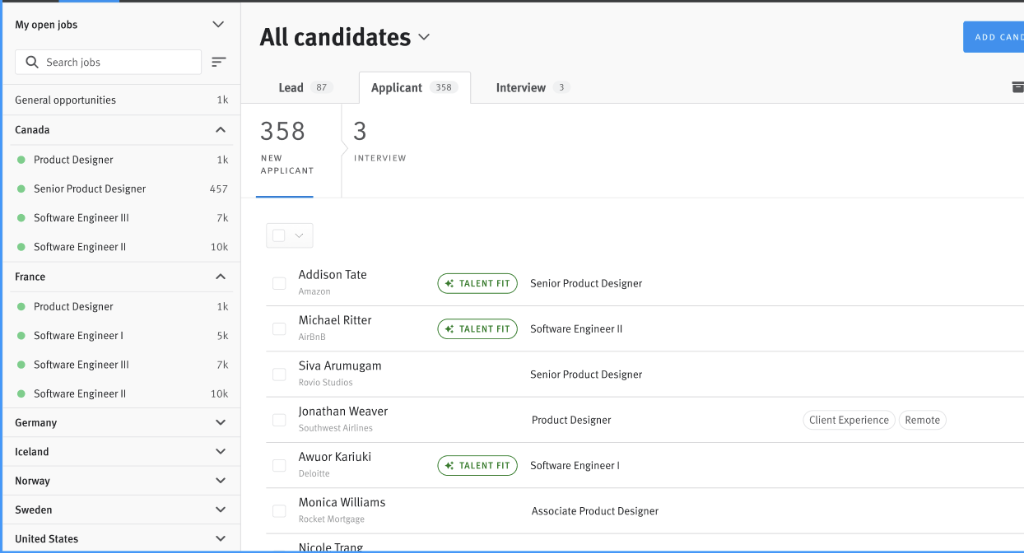
Official Lever candidate pipeline displaying green Talent Fit badges next to qualifying applicants in the New Applicant stage. High-match candidates are highlighted for prioritized review, while remaining applicants remain fully active in the pool. Source: Employ Inc. / Lever Documentation.
Ashby: AI-Assisted Application Review and evidence grounding
Ashby represents the modern generation of data-driven, structured recruiting platforms. In official technical documentation for AI-Assisted Application Review, Ashby provides an AI evaluation framework built on a fundamental design principle: evidence extraction over keyword counting.
Hiring teams can define up to 50 custom criteria per job consideration. When candidates apply, Ashby evaluates each requirement individually and assigns one of three discrete evaluation statuses: "Meets," "Does Not Meet," or "Undecided."
To assist recruiters during high-volume screening, Ashby surfaces these evaluations in the candidate pipeline:
- AI Job Criteria Met Percentage: Recruiters can add a dedicated pipeline column displaying the exact percentage of configured criteria the candidate satisfied. This allows reviewers to sort and prioritize applicants based on criteria alignment.
- Citation Grounding and Evidence Verification: Rather than acting as an opaque black box, Ashby surfaces clickable citations extracted directly from the candidate's work history. When the AI determines that an applicant meets a qualification (such as experience managing distributed databases or leading cross-functional teams), it highlights the exact supporting sentences from the resume, allowing recruiters to quickly verify the evaluation.
- Substance Analysis on Written Responses: Ashby evaluates candidate responses to short-answer application questions, detecting low-effort answers, placeholder text, or non-answers so recruiters can archive them without manual review fatigue.
- Strict Separation from Human Scoring: Ashby's architecture maintains an absolute boundary between AI evaluations and human evaluations. The Application Review Average Score displayed in candidate scorecards is computed exclusively from human ratings. The AI's criteria evaluations exist solely as an assistive research overlay and do not alter human reviewer scores.
- Intentional Resource Governance: Organizations manage the feature under Admin > Opt-in Features. Because deep semantic evaluation requires substantial computational resources, Ashby operates on a metered model consuming one AI Credit per candidate evaluation across up to 50 criteria, encouraging teams to deploy AI screening intentionally for high-volume roles.
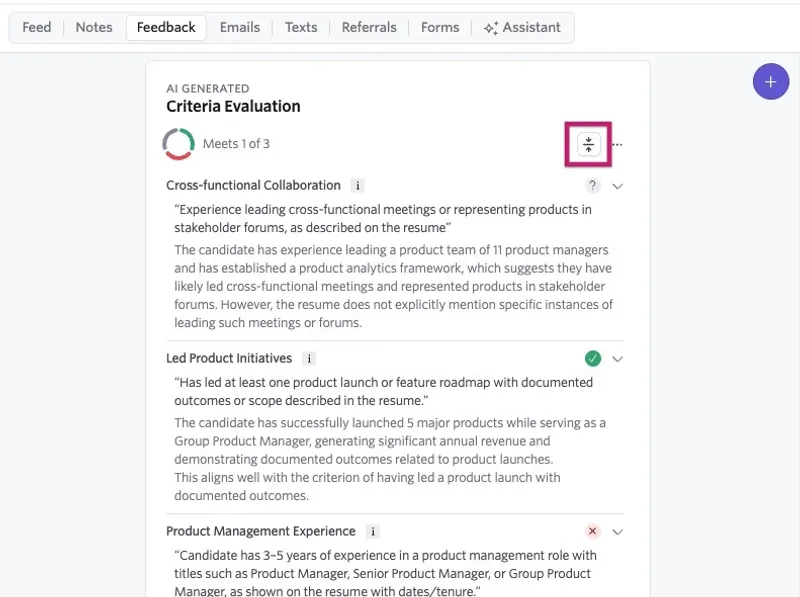
Official Ashby Criteria Evaluation panel displaying the three discrete evaluation statuses: Meets (green checkmark), Does Not Meet (red cross), and Undecided (gray question mark), accompanied by extracted resume evidence citations. Source: Ashby Documentation.
Oracle: Intelligent Matching star ratings and Taleo prescreening
Oracle powers enterprise talent acquisition across two generations of technology: modern Oracle Fusion Cloud Recruiting and legacy Oracle Taleo Enterprise Edition. Both architectures provide a masterclass in how actual enterprise systems evaluate candidates compared to consumer myths.
Modern Oracle Recruiting: Suggested Candidates and the four-dimension star rating
In modern Oracle Cloud Recruiting, artificial intelligence is integrated through an AI Apps feature called Suggested Candidates, powered by a machine learning engine known as Intelligent Matching.
Rather than outputting a single, arbitrary percentage score, Intelligent Matching compares the details of candidate profiles against open job requisitions across four distinct operational dimensions:
- Profile: High-level alignment of the candidate's career trajectory, industry background, and role focus.
- Education: Degrees earned, fields of study, and institutional alignment against requisition preferences.
- Experience: Job titles, duration of tenure, and depth of past professional roles.
- Skills: Extracted and normalized competencies mapped against the required skills list.
When recruiters view suggested candidates on a job requisition, Oracle does not present a single 0 to 100 number. Instead, the interface displays a visual star rating (0 to 3 stars) for each of the four categories independently. A candidate might display 3 stars in Experience and 3 stars in Skills, but 1 star in Education.
Furthermore, Oracle equips recruiters with Similar Candidates. When an employer identifies an exceptional applicant or employee, Intelligent Matching searches the talent pool for candidates who share comparable traits, skills, and background.
Crucially, Oracle documentation explicitly emphasizes that Suggested Candidates is an assistive sourcing and prioritization tool. It does not replace human judgment, nor does it automatically reject applicants who receive low star ratings.
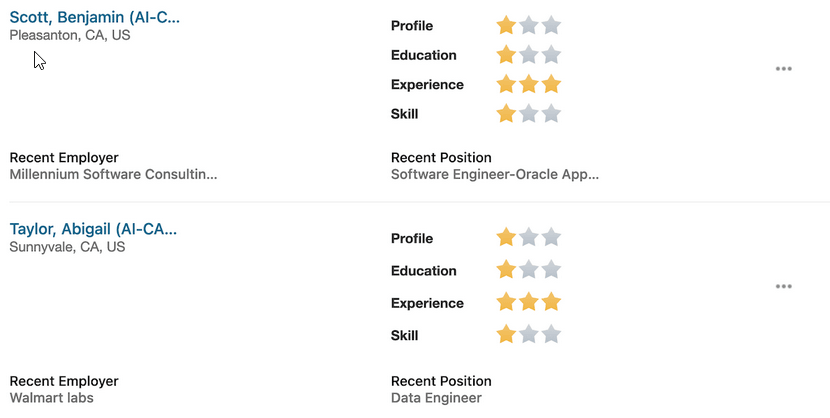
Official Oracle Fusion Cloud Recruiting interface showing the four-dimension star rating (Profile, Education, Experience, and Skill) generated by Intelligent Matching for Suggested Candidates. Source: Oracle Documentation.
Legacy Oracle Taleo: ACE Prescreening and Disqualification
For organizations still operating on Oracle Taleo Enterprise Edition, candidate handling is governed by a rigorous prescreening framework outlined in the Oracle Taleo Enterprise Edition Using Recruiting guide:
- The Disqualification Questions Library: As detailed in the guide on how administrators create disqualification questions in the Library, disqualification questions are created exclusively by content managers and system administrators. Recruiters cannot modify or remove these questions on an active requisition.
- OLF Contextual Binding: Questions are bound to Organization, Location, and Job Field (OLF) structures. When a requisition is opened in a designated location or department, the mandatory disqualification questions attach automatically.
- Strict Prescreening Architecture: Taleo enforces a precise sequential order within the prescreening block: 1) Disqualification Questions, 2) Competencies, and 3) Prescreening Questions.
- Candidate Selection Workflow (CSW) Integration: If an applicant selects an answer designated as disqualifying, Taleo's Candidate Selection Workflow automatically changes their application status to disqualified. The candidate is filtered out before any recruiter opens the file, and without any semantic analysis of the resume text.
- ACE Thresholds (Appraisal of Candidate Eligibility): Prescreening questions and competencies are marked as either "Required" or "Asset." Recruiters define an ACE threshold (such as meeting 100% of required criteria and a minimum percentage of asset criteria). Candidates meeting this benchmark are awarded the ACE Star Icon on the recruiter candidate list.
- Automated Prescreen Alerts: When an applicant achieves ACE status, Taleo can dispatch an automated email notification directly to recruiters or hiring managers. This allows them to initiate immediate outreach while non-ACE applications wait in the general queue.
Real-world examples: what actually moves a candidate score higher or lower
Because modern systems like Workday, iCIMS, Ashby, and Oracle evaluate structured entities rather than surface keywords, the tactics commonly recommended by resume-checker tools often have the opposite of their intended effect.
Here is how real enterprise algorithms evaluate candidate attributes compared to common resume myths.
Scenario 1: Keyword repetition vs. standardized skill mapping
Candidate A repeats 'Agile Project Management' 8 times. Candidate B mentions 'scrum sprints' once and 'Jira roadmapping' once.
Candidate A scores 95% because their keyword density matches the job description. Candidate B fails the match threshold.
Workday Skills Cloud and Oracle Intelligent Matching map Candidate B's terms to the Agile competency node in their skills graphs. Candidate A's repetition adds zero additional weight because modern skills databases count unique concepts, not raw frequency. A human recruiter skimming Candidate A's profile notices the awkward repetition and archives them.
Scenario 2: Introductory summary lists vs. contextual work history
Candidate A puts a 20-word skill block at the top of their resume. Candidate B demonstrates the skills directly within their bullet points.
Both resumes score equally well because the required words are present on the page.
Ashby's AI, iCIMS Role Fit, and Oracle's Experience rating weight skills by recency and contextual association. Ashby searches for proof in work experience; an unevidenced list in a summary block receives low confidence. Candidate B ranks significantly higher because their skills are tied to real roles and measurable dates.
Scenario 3: Job title alignment and career recency
A requisition calls for a 'Senior Product Manager'. Candidate A held that exact title for 3 years. Candidate B held the title 'Product Operations Analyst' but stuffed 'Product Management' throughout their descriptions.
Candidate B can achieve an identical 90%+ match score by stuffing the phrase into past bullets.
Enterprise matching engines place heavy structural weight on standardized job title taxonomies and tenure in the most recent position. Candidate A is assigned 'Grade A' by Workday HiredScore AI, earns 3 stars in Experience within Oracle Intelligent Matching, is placed in Greenhouse's 'Strong match' tier, and receives the '✦ TALENT FIT' badge in Lever. Candidate B is graded 'Grade C' or flagged as a title mismatch, irrespective of keyword frequency.
How recruiters actually use the ATS interface
Understanding the recruiter's physical screen dispels the remaining mystery surrounding applicant tracking systems. Recruiters do not sit in front of an algorithmic command console monitoring percentage bars or waiting for an AI to greenlight candidates.
Instead, human recruiters navigate high-volume review queues in five to ten seconds per application, relying on dual-pane PDF previews, structured form responses, and keyboard shortcuts.
How Recruiters Actually Use ATS Software
We broke down the actual recruiter screen in a dedicated companion guide. Explore split-screen PDF viewers, keyboard triage hotkeys in Lever and Ashby, Boolean search syntax for candidate rediscovery, and how interview scorecards coordinate hiring decisions.
Actionable advice: writing for real recruiting software
Knowing how enterprise recruiting platforms actually function allows job seekers to redirect their energy away from gaming non-existent scoring bots and toward strategies that yield real results.
1. Treat application questions with utmost care
Because knockout questions are the only mechanism that executes automated rejections, every form field on an application must be answered with precision. If an application asks whether you possess five years of professional experience with a specific technology, and you answer "No" because you have four years and eleven months, a preconfigured rule may archive your submission before human review.
2. Prioritize structural clarity over layout acrobatics
While modern ATS parsers can handle two-column layouts and clean vector graphics, complex visual elements can cause text extraction errors. When an ATS parser misreads a multi-column format, it may merge your employer name into your job title or attach your employment dates to the wrong company. Keep formatting clean, sequential, and hierarchical. Standard headings like "Experience," "Education," and "Skills" ensure accurate entity mapping across every parser.
3. Connect skills directly to business outcomes
Algorithms like Ashby's Criteria Met system, Oracle Intelligent Matching, and human recruiters all search for evidence. Rather than grouping skills into an unverified list at the bottom of the page, integrate your tools and languages directly into outcome-oriented bullet points:
- Weak: "Python, SQL, BigQuery, data modeling."
- Strong: "Built automated data pipelines in Python and BigQuery to process 4 million daily transaction records, reducing reporting latency by 40%."
The strong bullet provides the contextual evidence modern AI models require to verify competence, while delivering the concrete impact human hiring managers look for during their initial screen.
4. Write for the human who makes the decision
The single most damaging consequence of chasing third-party ATS scores is that it leads candidates to write awkward, repetitive, keyword-stuffed documents that read like technical instruction manuals.
Even if an algorithm assigns your resume to a "Strong Match" tier or awards 3 stars across the board, that rating merely places your document in front of a human recruiter. If that recruiter finds an unreadable block of stuffed phrases, they will click "Archive" in five seconds.
The goal of a resume is not to satisfy an imaginary 80% bot. The goal is to clearly and accurately communicate your professional value to the human being on the other side of the screen.
Primary sources and vendor documentation
For job seekers, recruiters, and engineering teams interested in examining the underlying technical documentation directly, the primary resources referenced in this article include:
- Greenhouse: Talent Matching in Greenhouse, Application Rules Overview, and the Greenhouse Structured Hiring Guide via Greenhouse Support.
- Workday: Workday AI for Recruiting, Workday HiredScore Spotlight Fit and Gap Enhancement with LLM, the official HiredScore AI Recruiting Agent Datasheet, and Workday Skills Cloud Architecture.
- iCIMS: iCIMS Coalesce AI Recruiting Software and iCIMS Responsible AI Principles.
- Lever: Screening Applicants Using Fast Resume Review and Talent Fit in Lever.
- Ashby: AI-Assisted Application Review and Auto-Reject Applications via the Ashby Knowledge Base.
- Oracle Cloud Recruiting: Overview of Suggested Candidates in Oracle Recruiting, View Suggested Candidates for a Job Requisition, and Similar Candidates in Oracle Recruiting.
- Oracle Taleo: Create Disqualification Questions in the Library and the Oracle Taleo Enterprise Edition Using Recruiting Guide.
- Legal Compliance: New York City Local Law 144 on Automated Employment Decision Tools (AEDT) via the NYC Department of Consumer and Worker Protection.